Signal Logging
Note
Information on how to retrieve and convert hoot files to compatible formats can be found in Extracting Signal Logs.
Phoenix 6 comes with a real-time, high-fidelity signal logger. This can be useful for any form of post analysis, including diagnosing issues after a match or using WPILib SysId.
The Phoenix 6 signal logger provides the following advantages over alternatives:
All status signals are captured automatically with their timestamps from CAN.
Status signals are captured as they arrive at their configured update frequency.
Logging is not affected by the timing of the main robot loop or Java GC, significantly improving the sensitivity and accuracy of system identification.
Custom user signals can be logged alongside the automatically captured status signals on the same timebase.
The highly efficient
hootfile format minimizes the size of the log files and the CPU usage of the logger.
The signal logging API is available through static functions in the SignalLogger (Java, C++, Python) class. Signal logging is enabled by default on a roboRIO 1 with a USB flash drive or a roboRIO 2, where logging is started by any of the following (whichever occurs first):
It has been at least 1 second since program startup (allowing for calls to
setPath), and the robot is enabled.It has been at least 5 seconds since program startup (allowing for calls to
setPath), and the Driver Station is connected to the robot.
Users can disable this behavior by calling SignalLogger.enableAutoLogging(false) (Java, C++, Python) at robot program startup.
Tip
Device status signals can also be viewed live in the Tuner X Plotting page.
Setting Log Path
The logging directory can optionally be changed using SignalLogger.setPath() (Java, C++, Python). If the specified directory does not exist, SignalLogger.setPath() will return an error code. Setting the path while logging will restart the log.
The below example sets the logging path to a ctre-logs folder on the first USB drive found.
SignalLogger.setPath("/media/sda1/ctre-logs/");
SignalLogger::SetPath("/media/sda1/ctre-logs/");
SignalLogger.set_path("/media/sda1/ctre-logs/")
Note
Each CAN bus gets its own dedicated log file. All logs will be placed in a subfolder named after the date and time of the start of the program.
Start/Stop Logging
The signal logger can be started and stopped using the start() and stop() functions (Java, C++, Python).
SignalLogger.start();
SignalLogger.stop();
SignalLogger::Start();
SignalLogger::Stop();
SignalLogger.start()
SignalLogger.stop()
Writing Custom Signals
Users can write custom signals to the currently opened logs by utilizing the write*() functions. An example application of this is logging your swerve odometry data.
The integer and floating-point write*() functions can optionally be supplied a units string to log alongside the data. Additionally, all write*() functions support an optional latency parameter that is subtracted from the current time to get the latency-adjusted timestamp of the signal. This can be useful for logging high-latency data, such as vision measurements.
Tip
In a WPILib robot project, custom data types can be logged using Struct and Protobuf. Additionally, Java robot projects can take advantage of Epilogue integration.
// Log the odometry pose
SignalLogger.writeStruct("odometry", Pose2d.struct, pose);
// Log the odometry period with units of "seconds"
SignalLogger.writeDouble("odom period", state.OdometryPeriod, "seconds");
// Log the camera pose with calculated latency
SignalLogger.writeStruct(
   "camera pose", Pose2d.struct, camPose,
   Timer.getTimestamp() - camRes.getTimestampSeconds()
);
// Log the odometry pose
SignalLogger::WriteStruct<frc::Pose2d>("odometry", pose);
// Log the odometry period with units of "seconds"
SignalLogger::WriteDouble("odom period", state.OdometryPeriod, "seconds");
// Log the camera pose with calculated latency
SignalLogger::WriteStruct<frc::Pose2d>(
   "camera pose", camPose,
   frc::Timer::GetTimestamp() - camRes.GetTimestamp()
);
# Log the odometry pose
SignalLogger.write_struct("odometry", Pose2d, pose)
# Log the odometry period with units of "seconds"
SignalLogger.write_double("odom period", state.odometry_period, "seconds")
# Log the camera pose with calculated latency
SignalLogger.write_struct(
   "camera pose", Pose2d, cam_pose,
   Timer.getTimestamp() - cam_res.getTimestamp()
)
Free Signals
Any log that contains a pro-licensed device will export all signals. Otherwise, the following status signals and all custom signals can be exported for free.
Click here to view free signals
Common Signals
VersionMajor
VersionMinor
VersionBugfix
VersionBuild
IsProLicensed
SupplyVoltage
Fault_UnlicensedFeatureInUse
Fault_BootDuringEnable
Fault_Hardware
Fault_Undervoltage
SupplyCurrent
StatorCurrent
MotorVoltage
Position
Velocity
DeviceEnable
RobotEnable
ConnectedMotor
Fault_DeviceTemp
Fault_ProcTemp
Fault_RemoteSensorDataInvalid
Fault_StaticBrakeDisabled
Fault_BridgeBrownout
Fault_RotorFault1
Fault_RotorFault2
SupplyCurrent
StatorCurrent
MotorVoltage
Position
Velocity
DeviceEnable
RobotEnable
ConnectedMotor
Fault_DeviceTemp
Fault_ProcTemp
Fault_RemoteSensorDataInvalid
Fault_StaticBrakeDisabled
Fault_BridgeBrownout
Fault_HallSensorMissing
Fault_DriveDisabledHallSensor
Fault_MotorTempSensorMissing
Fault_MotorTempSensorTooHot
Fault_MotorArrangementNotSelected
Position
Velocity
Yaw
AngularVelocityZWorld
NoMotionEnabled
NoMotionCount
UpTime
DistanceMeters
ProximityDetected
SignalStrength
Pin1State
Pin2State
S1Closed
S2Closed
QuadPosition
QuadVelocity
Pwm1_Position
Pwm1_Velocity
Pwm2_Position
Pwm2_Velocity
Overcurrent
Fault_5V
OutputCurrent
DeviceTemp
MaxSimultaneousAnimationCount
Fault_Overvoltage
Fault_5VTooHigh
Fault_5VTooLow
Fault_Thermal
Fault_SoftwareFuse
Fault_ShortCircuit
Low Storage Space Behavior
If the target drive (i.e. flash drive or roboRIO internal storage) reaches 50 MB free space, old logs will be deleted, and a warning will be printed.
If the target drive reaches 5 MB of free space, logging will be stopped, and an error will be printed. Logging cannot be resumed until more disk space is made available.
An example error that may occur if the free space limit is reached is shown below.
[phoenix] Signal Logger: Available disk space (3 MB) below 5 MB, stopping log
Converting Signal Logs
Signal logs can be converted to other common file formats such as WPILOG or MCAP using the Tuner X Log Extractor.
Additionally, the owlet CLI tool can be used from a terminal, including on platforms not supported by Tuner X. owlet can be downloaded from the CLI Tools download page.
To view a list of available commands, run owlet either with no parameters or with --help.
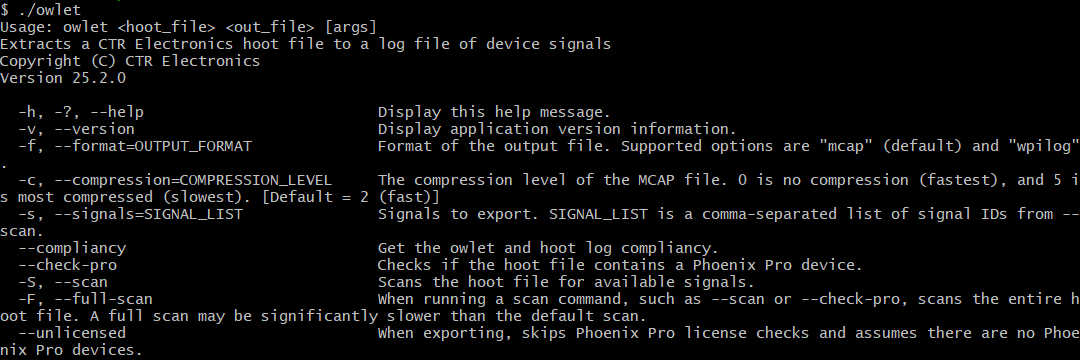
As an example, to convert a hoot file to WPILOG, run:
./owlet -f wpilog "input.hoot" "output.wpilog"